
FREE GOOGLE SHEETS TOOL
Find Your Remote Work Direction
Explore & compare 44 remote-work areas across 10 key factors to narrow your options and focus your research
Preview without signup. Get your editable copy by email.
Take a look inside
Spend less time searching in circles and more time moving toward a direction that Actualy fits you
Browse the preview to see the work areas and comparison fields
* This preview is view-only. Get your own Google Sheets copy to mark your interest, filter the list, and compare your options.
How It Works
from Too Many Options to a useful shortlist of favorite routes
1. Discover Your Options
Much more than a handful of job titles
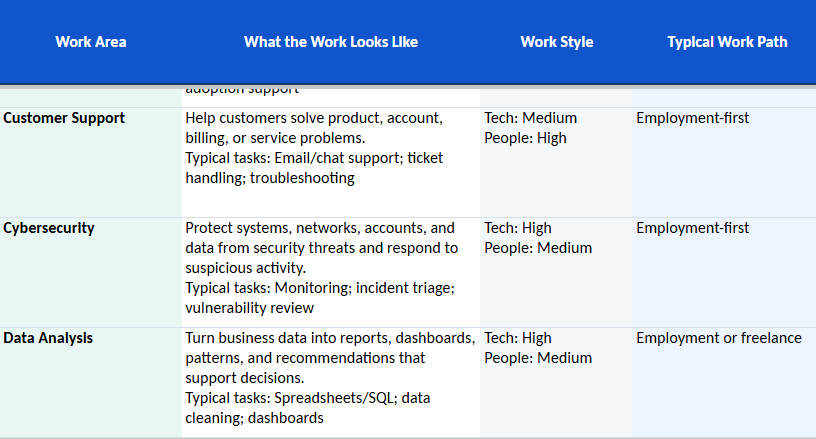
Explore 44 areas. See what the work involves, the level of technical work and people interaction, and the typical path into each area.
2. Understand What It Takes
Look beyond the job title
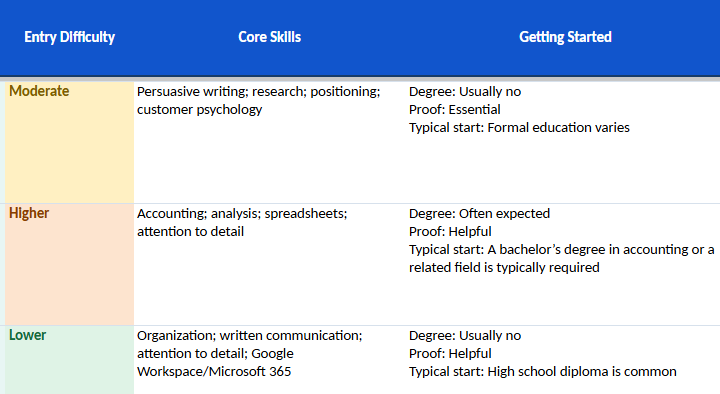
Compare the salary, core skills, entry difficulty, starting requirements. Read the watch-outs and AI outlook to get a fuller picture of each option.
3. Narrow down your options
Less scrolling. Easier comparison
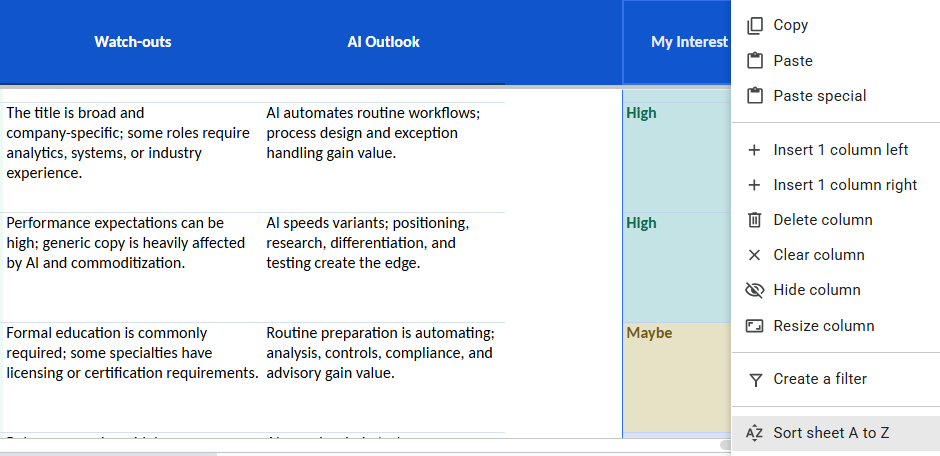
Mark each area High, Maybe, or No, then filter My Interest to focus on the options you want to explore.

4. Compare your strongest options
Bring your strongest options together in one view
Use the Compare My 3 sheet to compare the work, requirements, skills, and available pay information side by side. Notice the differences that matter to you and decide which directions deserve a closer look.
Start Exploring Your Options
Enter your email address to get your own editable copy of Remote Work Explorer
We’ll email you the link to create your copy.
For the best experience, use it on a computer.
FAQ
Yes. The 2026 Starter Edition is free. Enter your email to receive the link to the Google Sheets resource.
You need a Google account to create and use your own editable copy.
It is designed for people who want to work remotely but are unsure which areas to explore. It can also help people considering a new direction compare their options.
No. It explains work areas and includes job titles you can research, skills to consider, and suggested starting steps. It does not list current vacancies or provide job placement.
You’ll receive a link by email. Open it in Google Sheets, sign in to your Google account, and make your own copy. Start with the START HERE tab, browse the areas, and use COMPARE MY 3 to compare three choices side by side.
No. You choose what interests you. The tool helps you compare options and identify 2–3 directions worth researching.
Yes. You can use it to explore work areas and compare skills and starting points. Requirements and opportunities vary by country, and individual remote jobs may have location restrictions.
No. The pay figures refer to U.S. occupations and are included for general comparison. Actual compensation varies by role, employer, location, and work arrangement.
They are U.S. occupational pay references for orientation, not guaranteed earnings or remote-only salaries. Figures may represent a broader occupation rather than every job title listed. Actual pay varies by role, location, experience, and employer. See START HERE for the methodology and limitations.
Found a direction that interests you?
Review 5–10 current remote job listings using the job titles in the sheet.
Look for skills, tools, and experience requirements that appear repeatedly. Check location restrictions, work arrangements, and posted compensation.
Use what you find to decide what to learn, prepare, or investigate next.
Can’t find the answer you’re looking for? Reach out here